AI-assisted engineering · 2026
3D Furniture Designer App
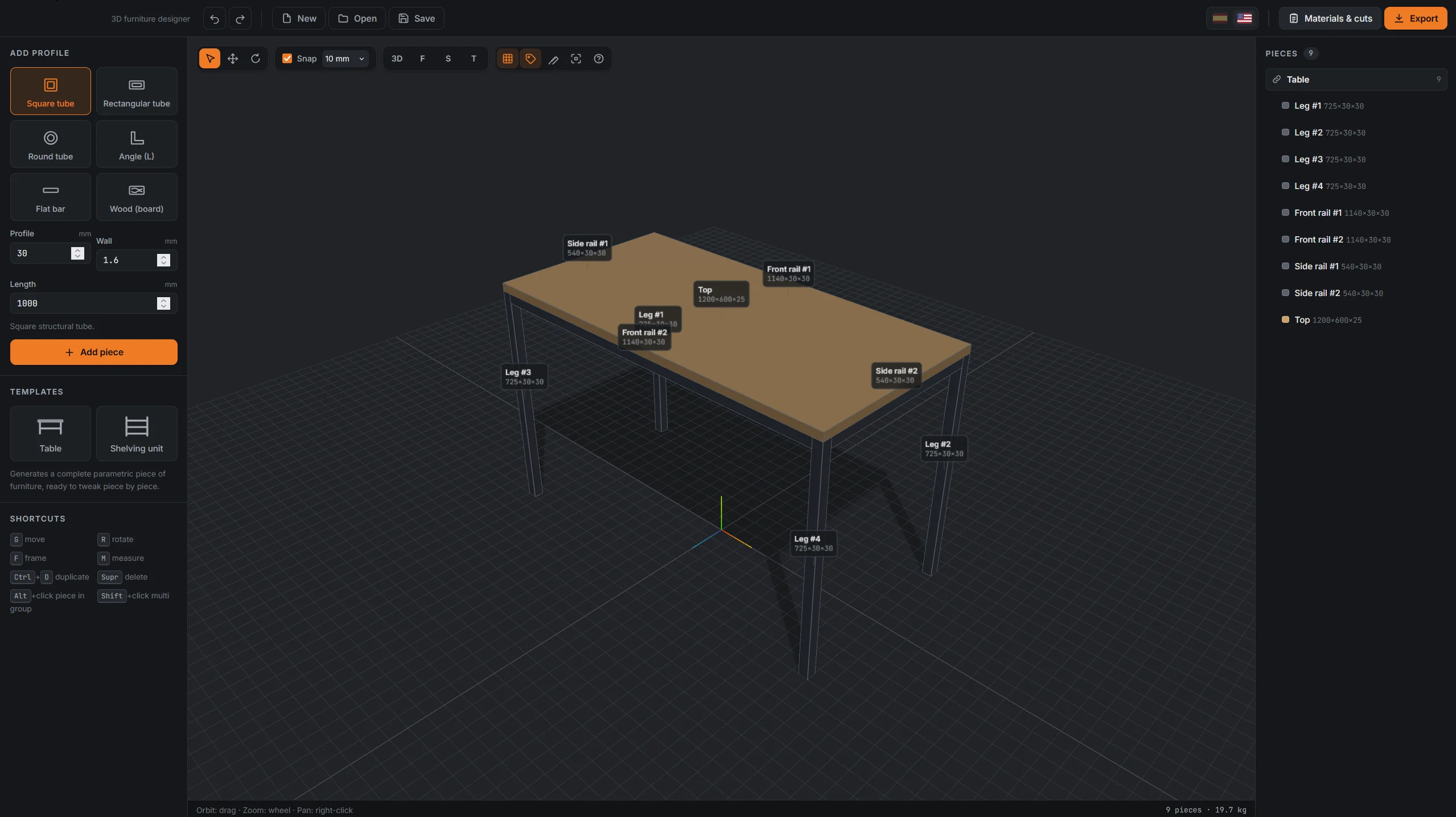
I build steel-and-wood furniture as a hobby. None of the applications I tried fit the way I work, so I specified my own and directed the build. 3D editor, optimized cut list, weight, cost and dimensioned drawings, running entirely in the browser as a single HTML file.
- AI-assisted
- Bin packing
- TypeScript
- Three.js
- WebGL
- Vite
- jsPDF
- Vitest
- Playwright
- Role
- Product · Direction · Review
- Timeline
- 2026 · Jul
Why I built it
I build furniture as a hobby, tables, desks and shelving in steel and wood. I tried a number of applications and none of them fit the way I work. Some had a weak 3D editor, some produced drawings I could not use at the bench, some would not let me set dimensions or move pieces freely. And none of them answered the questions that decide what I actually buy: how many stock bars, cut in what order to waste the least, weighing how much, costing how much. So I built the one I wanted, where the viewport is the means and the cut list, the bill of materials and the dimensioned drawings are the product.
How it was built
The implementation was largely AI-assisted. JavaScript is not my language, and learning a 3D stack was never the point. What I brought was the specification and the domain: what a fabrication drawing has to show, why stock comes in commercial lengths, why saw kerf changes the answer, what a welder needs at the bench. My work was directing that build, reviewing the code, testing it against furniture I actually make, and deciding what mattered. The architecture rests on one principle that runs through everything: fabrication parameters are the single source of truth, and geometry is always rebuilt from them rather than scaled, which is also why the domain layer carries no dependencies at all, no DOM and no Three.js, and can be tested in plain Node.
How it works
- 01
Parametric catalog
Commercial steel profiles and wood boards are defined by real fabrication parameters, with geometry rebuilt on every edit.
- 02
Direct manipulation
Move, rotate, snap, group, mirror and duplicate pieces, plus generate furniture from editable parametric templates.
- 03
Cut optimization
A first-fit decreasing bin-packing algorithm distributes cuts across stock bars while accounting for saw kerf and reports material utilization.
- 04
Weight & cost
Accurate cross-sectional calculations estimate real weight and material cost before fabrication.
- 05
Document generation
Technical drawings and cut lists are generated directly in the browser as PDFs using WebGL renders, Canvas and jsPDF.
- 06
Interchange
Projects export to glTF, OBJ and JSON, with autosave and migration support for older project versions.
Stack
- Language
- TypeScript (strict)
- 3D
- Three.js · WebGL
- Documents
- jsPDF · Canvas 2D
- Build
- Vite → single HTML file
- Testing
- Vitest (59 unit) · Playwright (17 e2e)
- Interface
- Vanilla DOM · no framework
Testing & review
- 59 unit tests cover the places where a silent mistake would be expensive: hand-verified weights per profile, bin-packing edge cases, file migration between format versions, and i18n completeness across both languages.
- 17 Playwright tests drive the real app in a real browser, because WebGL contexts, raycasting against an actual camera and the UI wiring cannot be faked by unit tests.
- Most tests are regression tests written the day a bug appeared, and each one names the bug in its comment: mirrored L-profiles wrong on one axis only, hidden profiles that could still be clicked, project files reaching the scene unvalidated.
- Code review caught the two most expensive bugs, both invisible in normal use. Every plans PDF opened three WebGL contexts and the browser tolerates about sixteen, so by the sixth export it killed the oldest, including the main viewport's, which froze until reload. Separately, the render loop was redrawing sixty times a second in front of a motionless scene; it now renders on demand, comparing a fingerprint of the scene state between frames.
What I learned
- The domain knowledge was the scarce input. Anyone can ask for a 3D editor; knowing the answer has to arrive as commercial bar lengths with kerf accounted for is what makes it useful at the bench instead of on screen.
- Directing a build I could not have written myself is a real skill with real limits. I could specify what a fabrication drawing must show and tell immediately when output was wrong, but I depended on review to catch the things that looked fine and were not.
- Reviewing code in a language I do not write is still worth the time. Spotting behaviour that contradicts the spec does not require being able to write the fix.
- Reading this codebase taught me why rebuilding geometry from parameters beats scaling meshes: non-uniform scale corrupts profiles on rotated pieces, and every downstream consumer, from the cut list to exports to dimension labels, silently inherits the error.
- Interoperability means honouring other tools' conventions rather than your own. glTF is canonically in metres, so exporting in internal units produces a file that opens without complaint and is wrong. Generated files have to be validated by re-importing them, not by assuming the export succeeded.
Limitations & next steps
- There are no parametric joints yet. Pieces do not know about each other, so moving a leg does not resize the bar spanning to it. Lengths derived from anchors is the single change that would most improve the design workflow.
- Being fully client-side with no backend is what makes it trivial to distribute, and also what rules out collaboration, project versioning and any shared catalog between users.
- The profile catalog is fixed in code: a shop working with sections I did not include cannot add them without editing the source.
- No DXF export yet, so the cut list cannot feed a CNC plasma or laser table directly. Along with a step-by-step assembly view for weld sequencing, that is the next thing worth building.
Outcome
- Entire application packaged as a single 1.4 MB HTML file requiring no installation, backend or user account.
- Automatically generates optimized cut lists, required stock bars, material weight and estimated cost.
- 76 automated tests, 59 unit and 17 end-to-end, validate engineering calculations, optimization logic, file migration and the real browser behaviour.
- Live bilingual interface in Spanish and English, with exported drawings and bills of materials in the active language.
- Includes a dedicated landing page introducing the application before entering the designer.