AI Tooling · 2026
YouTube Video Transcriber
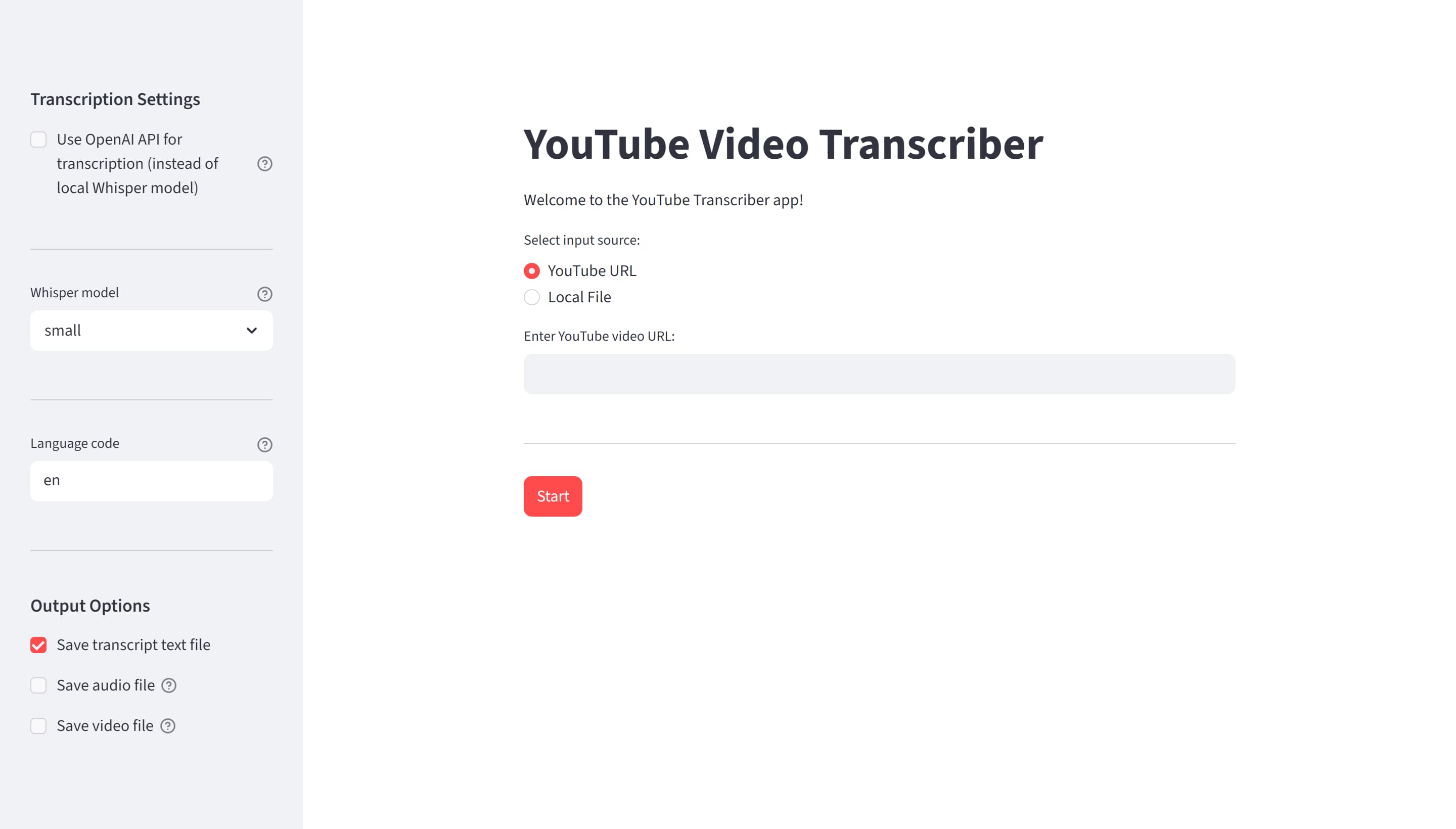
A Python CLI and Streamlit GUI that downloads YouTube videos and turns them into text transcripts and .srt subtitles, using either a local Whisper model or the OpenAI API.
- Python
- Whisper
- OpenAI API
- yt-dlp
- FFmpeg
- Streamlit
- Role
- Design · Build
- Timeline
- 2026 · Mar-Jun
Why I built it
I wanted to get the text out of YouTube videos without paying per minute or settling for auto-captions, and I used that as an excuse to learn several things at once: how Whisper actually performs, how to consume the OpenAI API, and how to package a Python project properly. The interesting constraint I set myself was making transcription dual, the same tool running a model locally on my own GPU or delegating to the API, because that forced the engine to become a real abstraction instead of a hardcoded call.
The approach
I built it as a modular Python package: yt-dlp handles the download, FFmpeg the audio extraction, and the transcription engine is pluggable, either a locally run Whisper model (offline, CUDA-accelerated) or the OpenAI Whisper API. Optional dependency groups mean you install only what you use, and both the CLI and the Streamlit GUI sit on the same core, so a feature added to the pipeline shows up in both interfaces at once.
How it works
- 01
Fetch
yt-dlp downloads the video or audio-only stream, with format selection and local files as an alternative input. It tries anonymously first and only falls back to extracting browser cookies when the failure looks like YouTube's bot detection.
- 02
Extract
FFmpeg extracts and converts the audio, automatically re-encoding to MP3 when a file exceeds the API's 25 MB limit.
- 03
Transcribe
The pluggable engine runs a lazily-loaded local Whisper model, only pulled into memory when a run actually needs it, or calls the OpenAI Whisper API. The user picks the trade-off per run.
- 04
Export
Transcripts are saved as plain text and .srt subtitles; files that already exist are detected and skipped, so nothing is processed twice.
Stack
- Language
- Python 3.12
- Download
- yt-dlp + FFmpeg (Node.js 22.6+ runtime)
- Engines
- Local Whisper (CUDA) · OpenAI Whisper API
- Interface
- CLI + Streamlit GUI
- Packaging
- Modular extras (local / api / gui)
What I learned
- Designing for two transcription backends from the start is what made the engine an abstraction rather than a function call. The API path and the local path ended up sharing everything except the transcription step itself.
- Optional dependency groups keep a tool light: video download, local inference and the API client install independently, so a user who only wants the API never pulls PyTorch.
- Idempotent file handling, skipping whatever already exists, turns a slow media pipeline into something you can re-run without thinking.
- A fallback is only worth having if it is narrow. The downloader retries with browser cookies only when the error text matches a bot-detection heuristic, so a private video or a typo in the URL still fails immediately instead of being retried for the wrong reason.
- Most of the engineering in a media tool is not the model: it is size limits, odd formats, bot detection and the fact that yt-dlp needs a modern Node.js runtime to resolve YouTube's JavaScript.
Limitations & next steps
- No automated test suite yet. The pipeline has been validated by running it, not by CI, and it is the first thing I would add.
- Developed and tested on Python 3.12 and Windows only; other versions and platforms are untried.
- Local transcription inherits Whisper's hardware appetite: usable speed really wants a CUDA GPU, and the larger models want VRAM to match.
- It depends on external tooling that moves, namely yt-dlp, FFmpeg and a current Node.js, so it needs occasional maintenance to keep working against YouTube.
Outcome
- One tool covers download, audio extraction, transcription and subtitle generation end to end.
- Fully offline transcription with a local Whisper model on GPU, or faster cloud runs via the OpenAI API, chosen per run.
- Ships as an installable package with a CLI and a Streamlit GUI built on the same core.